
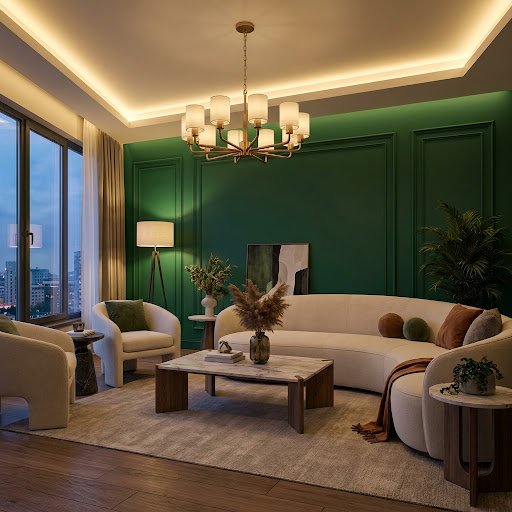
10 living room design ideas
1. Start with a focal point
Choose one point the room is arranged around, such as a window, fireplace, TV wall or large artwork, and face your main seating towards it.
2. Float the furniture
Pulling the sofa a little away from the wall and grouping chairs around a coffee table creates a more intimate conversation area.
3. Go bold on one wall
A deep green, navy or terracotta feature wall, or simple wall panelling, adds depth and character. Preview it with the wall paint visualizer.
4. Use a rug that is big enough
At least the front legs of every seat should sit on the rug. A rug that is too small makes the whole room look disconnected.
5. Layer three kinds of light
Combine ambient light from the ceiling, task light from floor and table lamps, and accent light such as LED strips or picture lights.
6. Mix materials and textures
Pair a soft fabric sofa with wood, metal, stone and woven pieces. Texture keeps a neutral living room from feeling flat.
7. Add greenery
A large floor plant and a few smaller ones on shelves bring life and colour, and suit every style from Modern to Minimalist.
8. Hang art at eye level
The centre of a picture should sit around 145 to 150 cm from the floor, or about 20 cm above the back of the sofa.
9. Build in storage
Low media units, sideboards and shelving keep cables, remotes and clutter out of sight so the room feels calm.
10. Finish with soft furnishings
Cushions, throws and curtains are the easiest and cheapest way to change the colour and season of a room.
Try these ideas on your own living room
Instead of guessing, photograph your living room in Dealviora and let the AI show you how it could look.
- Redesign the whole living room in a new style
- Decorate with a new sofa, rug, lighting and decor
- Fill an empty corner or blank wall
- Find furniture and decor that match the design you choose